

Get quote
Get Free Consultation!
We are ready to answer right now! free consultation.
Email:ttxxkj888@gmail.com
Product Detail
IP column loudspeaker for smart poles, emergency notices, public address and background music in outdoor areas.
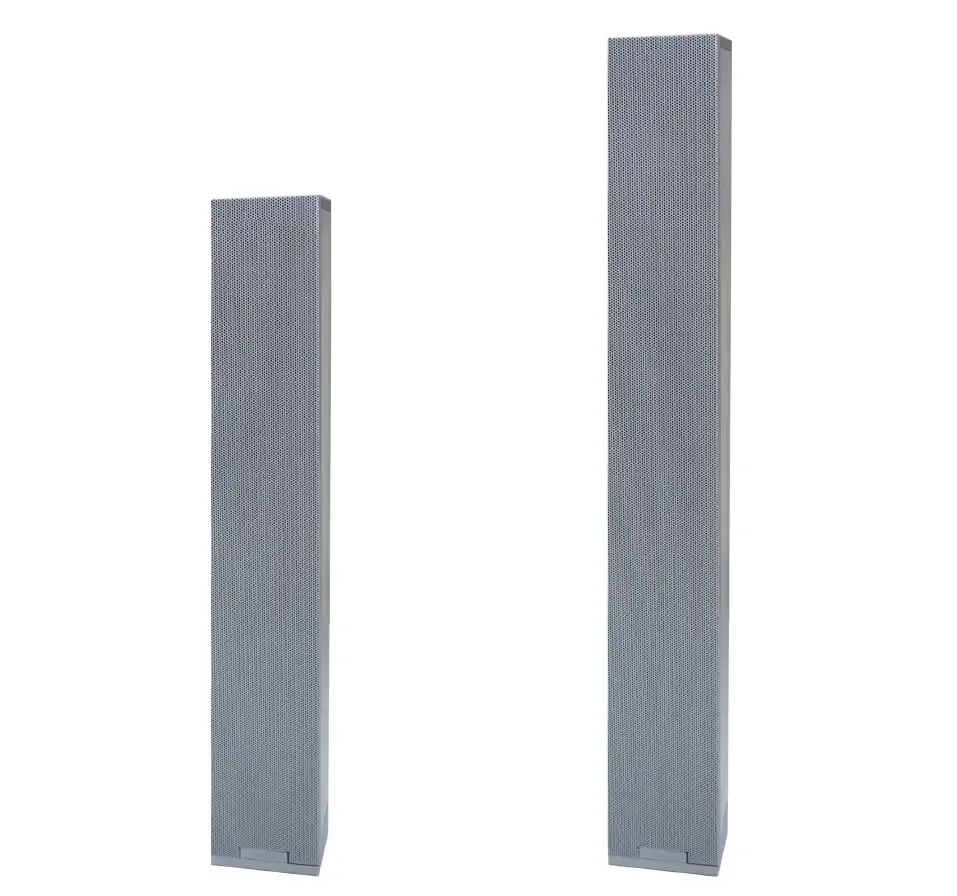
| Item | Specifications | Specifications |
|---|---|---|
| Power Supply / Power Consumption | DC24V/2.7A, ≤40W | DC24V/2.7A, ≤50W |
| Power | 30W | 40W |
| Line Input Sensitivity | 1V | 1V |
| Network Interface | RJ45 | RJ45 |
| Audio Input Interface | 3.5mm stereophonic socket | 3.5mm stereophonic socket |
| Volume Control | Line input analog adjustment, total volume digital adjustment | Line input analog adjustment, total volume digital adjustment |
| Working Status Indicator | Two-tone LED | Two-tone LED |
| Audio Sampling & Bit Rate | 8kHz ~ 44.1kHz, 16bit, 8kbps-320kbps | 8kHz ~ 44.1kHz, 16bit, 8kbps-320kbps |
IP column loudspeaker for smart poles, emergency notices, public address and background music in outdoor areas.
IP column loudspeaker for smart poles, emergency notices, public address and background music in outdoor areas.
IP column loudspeaker for smart poles, emergency notices, public address and background music in outdoor areas.
IP Column loudspeaker
This product is an IP column loudspeaker specially designed for smart street lights, which is the core audio broadcast terminal of the urban smart street light public address system. It is widely used in smart street poles, municipal roads, parks, communities, campuses and other public areas, providing high-quality audio broadcast, background music playback, emergency notice release and other functions for public areas.
The device adopts advanced network audio technology, supports wired network connection, and can be seamlessly connected to the smart street light IoT gateway and upper-level public address management platform. It has the characteristics of stable audio transmission, clear sound quality, flexible volume adjustment, and strong environmental adaptability, which can meet the needs of daily public broadcast, emergency notification and background music playback in smart street light scenarios, and assist in building a safe, efficient and intelligent public broadcast system.
All contents in this manual are protected by copyright laws. No organization or individual may copy, tamper with, or reprint all or part of this manual in any form without permission. The relevant responsible party reserves the right to modify, supplement, interpret, and update this manual at any time without prior notice.
Stable network communication: Supports 10/100Mbps network rate, compatible with multiple network communication protocols, ensuring stable and smooth audio transmission, with network delay ≤50ms.
High-quality audio performance: Adopts high-performance audio processing technology, with wide frequency response, high signal-to-noise ratio, low total harmonic distortion, and clear and full sound quality.
Flexible audio input: Equipped with line input interface and 3.5mm stereo audio input socket, supporting multiple audio input modes to meet different broadcast needs.
Convenient volume control: Supports analog adjustment of line input volume and digital adjustment of total volume, which can be flexibly adjusted according to on-site environment and broadcast needs.
Intuitive working status indication: Equipped with two-tone LED working status indicator, which can clearly display the working status of the device, facilitating on-site inspection and maintenance.
Support for secondary expansion: Reserved interface for connecting secondary loudspeakers, which can be expanded according to on-site coverage needs (note: partial models do not support secondary loudspeaker connection).
Reliable power supply: Adopts DC24V stable power supply, with low power consumption, safe and reliable, adapting to long-term outdoor operation.
Easy parameter configuration: Supports computer connection configuration through special configuration tools, simple operation, and can quickly complete IP parameter setting.
Strong environmental adaptability: Industrial-grade design, suitable for outdoor harsh environments, with good high and low temperature resistance and humidity resistance.
Customized for smart street poles: Compact structure, lightweight design, suitable for installation on smart street poles, does not occupy additional space, and matches the overall style of smart street lights.
Easy installation and maintenance: Standardized interfaces and complete installation accessories, simple installation process, convenient later inspection and maintenance.
Wide compatibility: Adopts standard network protocols, can be seamlessly connected to the smart street light management platform and public address system, and has strong compatibility.
Stable and durable: Strict production and testing standards, long service life, low failure rate, suitable for long-term unattended outdoor operation.
Flexible application: Suitable for various public areas such as municipal roads, parks, and communities, and can meet the needs of daily broadcast and emergency notification.
Overall Dimensions: 83.2×88.1×450mm (2.0kg) / 83.2×88.1×600mm (2.6kg)
Installation Mode: Wall-mounted installation, suitable for concrete structure walls, fixed with matching brackets and screws
Key Components: Built-in audio amplifier, loudspeaker unit, network module, status indicator
Working Environment: -10℃~+50℃, Relative Humidity ≤90%RH (non-condensing)
Power Supply Mode: DC24V power adapter supply
| Item | Specifications | Specifications |
|---|---|---|
| Power Supply / Power Consumption | DC24V/2.7A, ≤40W | DC24V/2.7A, ≤50W |
| Power | 30W | 40W |
| Line Input Sensitivity | 1V | 1V |
| Network Interface | RJ45 | RJ45 |
| Audio Input Interface | 3.5mm stereophonic socket | 3.5mm stereophonic socket |
| Volume Control | Line input analog adjustment, total volume digital adjustment | Line input analog adjustment, total volume digital adjustment |
| Working Status Indicator | Two-tone LED | Two-tone LED |
| Audio Sampling & Bit Rate | 8kHz ~ 44.1kHz, 16bit, 8kbps-320kbps | 8kHz ~ 44.1kHz, 16bit, 8kbps-320kbps |
| Frequency Response | 60Hz-20kHz | 60Hz-20kHz |
| SNR | ≥65dB (A Weighted) | ≥65dB (A Weighted) |
| Audio Coding | MP2/MP3/PCM/ADPCM | MP2/MP3/PCM/ADPCM |
| Audio Format | WAV(8K, 22K), MP3(32kbps~192kbps) | WAV(8K, 22K), MP3(32kbps~192kbps) |
| Total Harmonic Distortion | ≤1%, 1kHz | ≤1%, 1kHz |
| Support Network Rate | 10/100Mbps | 10/100Mbps |
| Support Network Communication Protocol | ARP, UDP, TCP/IP, ICMP, IGMP | ARP, UDP, TCP/IP, ICMP, IGMP |
| Network Delay | ≤50ms | ≤50ms |
| Dimensions / Weight | 83.2×88.1×450mm (2.0kg) | 83.2×88.1×600mm (2.6kg) |
| Operating Temperature and Humidity | -10℃~+50℃, ≤90%RH (non-condensing) | -10℃~+50℃, ≤90%RH (non-condensing) |
Line Input Interface: Connect external audio sources to realize audio input and broadcast playback.
Secondary Loudspeaker Connection Interface: Connect secondary loudspeakers to expand broadcast coverage (note: partial models do not support this function).
Network Interface (RJ45): Insert network cable and connect to the switch, realizing network connection and audio data transmission, supporting stable network communication.
Power Input Interface: Connect DC24V power adapter to provide stable working power for the device.
Audio Input Interface (3.5mm): Connect external audio devices through 3.5mm stereo socket, supporting additional audio input.
Strictly distinguish the positive and negative poles of the power supply, and use the specified DC24V/2.7A power adapter to avoid equipment damage caused by wrong power supply or voltage mismatch.
When wiring the network cable, ensure that the connection is firm, and avoid poor contact which leads to network disconnection and audio transmission failure.
The line input interface and audio input interface should be connected correctly according to the interface definition, and short circuit is strictly prohibited to avoid damage to the audio circuit.
When connecting the secondary loudspeaker, confirm whether the device model supports this function first, and strictly follow the wiring requirements to avoid overload damage.
Outdoor wiring must be done with waterproof and anti-corrosion treatment, and the wiring terminals should be pressed firmly to avoid poor contact and signal interference.
During wiring, separate strong and weak electric wires to avoid electromagnetic interference affecting audio quality.
The device is suitable for installation on concrete structure walls. Before installation, ensure that the installation surface has sufficient strength to avoid installation instability caused by insufficient bearing capacity.
Use the matching installation bracket and screws to fix the device firmly, and adjust the installation angle according to the broadcast coverage needs to ensure the best sound transmission effect.
Expansion bolts are not standard accessories, please configure them according to on-site installation needs and installation surface conditions.
Before power on, check the correctness of wiring, especially the power supply positive and negative poles and network cable connection, to avoid equipment damage caused by wrong wiring.
Parameter configuration: Connect the computer installed with the configuration tool to the device through a network cable, run the configuration tool, enter the default password to log in, select "forced configuration", fill in the correct parameters, and send the parameters to complete the configuration.
During use, if the device fails (such as no sound, network disconnection, abnormal indicator light), check the power supply, network connection and wiring first, and contact professional personnel for maintenance if the fault cannot be solved.
Regularly check the working status of the device, clean the surface dust and debris, and check the tightness of the wiring terminals to ensure stable operation of the device.
Avoid installing the device in areas with severe water accumulation, strong electromagnetic interference or direct sunlight for a long time, so as to extend the service life of the device.
Non-professional personnel are prohibited from disassembling the device or modifying internal parameters, so as to avoid equipment failure or safety hazards.
Please read this user manual carefully before using the product and follow all operation instructions. The relevant responsible party will not be liable for any damage caused by misuse of the product due to violation of this manual.
The relevant responsible party is not liable for equipment failure or abnormal operation caused by improper installation, unauthorized disassembly and modification by non-professionals, wrong wiring, overload use or use of non-specified power supply.
The whole-machine original warranty will become invalid immediately once the product shell is opened privately or the internal circuit is modified.
Damage caused by force majeure including natural disasters, lightning strikes, power grid surges, artificial damage and other factors is not covered by free warranty.
If the product is connected to the Internet, the user shall bear the risks such as network attack, hacker intrusion and virus infection. The relevant responsible party is not liable for product abnormal operation, information leakage and other problems caused by this, but will provide timely technical support.
For technical support such as protocol docking, platform debugging, on-site maintenance and fault handling, please contact the professional technical team.
Need drawings, project pricing or configuration support for IP Column Loudspeaker?
Get Quote